 WPGrowKit
 Four quiz templates. Try each one live.
Classic, Minimal, Full Screen and Conversational all come with the free Quizably plugin. Take a real quiz in each one below to see how it feels before you install anything.
The demos run the real quiz player in your browser. Nothing you answer is stored.
Template
Sample quiz
Previewing Classic
- Layout
- A bordered card, 640 px wide by default
- Question counter
- "Question x of y" line above each question
- Works well for
- Quizzes inside blog posts and pages, and your first quiz
- Keep in mind
- Card width, minimum height and the border can all be adjusted in the Design drawer.
The four templates side by side
| Template | Layout | Question counter | Works well for |
|---|---|---|---|
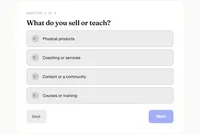 Classic Preview Classic Preview | A bordered card, 640 px wide by default | "Question x of y" line above each question | Quizzes inside blog posts and pages, and your first quiz |
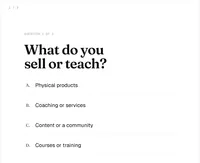 Minimal Preview Minimal Preview | A page-wide stage with no card | An "n / total" counter on question screens | Text-led quizzes and themes with a clean background |
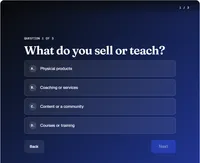 Full screen Preview Full screen Preview | A fixed, full-viewport overlay in a dark tint | An "n / total" counter in a top navigation bar | Dedicated landing pages and image-led quizzes |
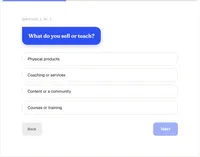 Conversational Preview Conversational Preview | A chat-style conversation | A thin progress track above the conversation | Casual, friendly quizzes for a social-style audience |
Which template should you pick?
Start from what you are building. You can switch later without losing your questions, answers or results.
-
If you are building
A quiz inside a blog post or page
Try
Classic or Minimal
Both sit comfortably within your content. Classic frames the quiz in a card, and Minimal lets it blend into the page.
-
If you are building
A dedicated landing page with a strong image
Try
Full screen
It takes over the viewport, so give it its own page and a dark background overlay.
-
If you are building
A friendly lead magnet for a casual audience
Try
Conversational
The chat-style flow suits short, informal quizzes.
Make any template match your brand
Pick a template for the structure, then use the Design drawer for the details. Nothing here needs custom CSS.
Design, colors and backgrounds- Colors, fonts, text size and button style
- Animation between screens
- A background image and overlay on individual screens
- Card width, minimum height and border on Classic
- Switch templates any time, and your content stays
Template questions
More detail is in the template documentation.
Are these templates included in the free plugin?
Yes. Classic, Minimal, Full Screen and Conversational all come with the free Quizably plugin, with no cap on how many quizzes you build.
Can I change the template after I build a quiz?
Yes. Open the quiz, click Design settings, choose a different template and click Save. Your questions, answers and results are kept.
Can I change colors, fonts and backgrounds?
Yes. The Design drawer lets you edit colors, fonts, text size, button style and animation, and you can set a background image and overlay on individual screens.
Will my WordPress theme change how a quiz looks?
The quiz styles use their own classes, so the theme does not restyle the quiz. The page width and background still matter, so test the quiz on the page where you embed it.
Do these demos save my answers?
No. They run the real quiz player in your browser without WordPress, so nothing you answer is stored or sent anywhere.
How do I check a template on my phone?
Open this page on your phone and try each template in the playground. That shows how the quiz player behaves on a small screen, before you install anything.
Found a look you like?
Install Quizably, build your first quiz, and pick the template in a few clicks.